Media & photos

Ardour
Free digital audio workstation for recording, editing and mixing audio and MIDI.
Version checked by hand on 2026-11-22. Snapshot from the included release data, not a live check.
No release-notes excerpt is recorded here.
Open the project's release source ↗Available on these platforms
Ready-to-run builds are paid downloads; the source code is free. A desktop download is not evidence of a native phone app.
Compatibility details and official sources
Official availability checked 2026-11-22. Availability is not feature parity. The recorded release and license refer to the linked source project; separate clients can differ. No install or compatibility test was run.
Before you install
A full recording and mixing desk that stays yours.
- Which package?
- Paid ready-to-run builds or the free source code from the project, distribution packages, the community Flatpak, or nixpkgs. Buying a build funds development.
- Where does my work live?
- Sessions are folders on your disk and recordings stay where you put them. Recording, editing, mixing and export all happen locally.
- Will it run on my machine?
- Linux, Windows, or macOS. Any interface your system can use works; complex sessions like a decent CPU and enough RAM.
Advice and funding routes source-checked November 22, 2026. Researched, not an install or restore test. Installation source ↗ · Report a correction
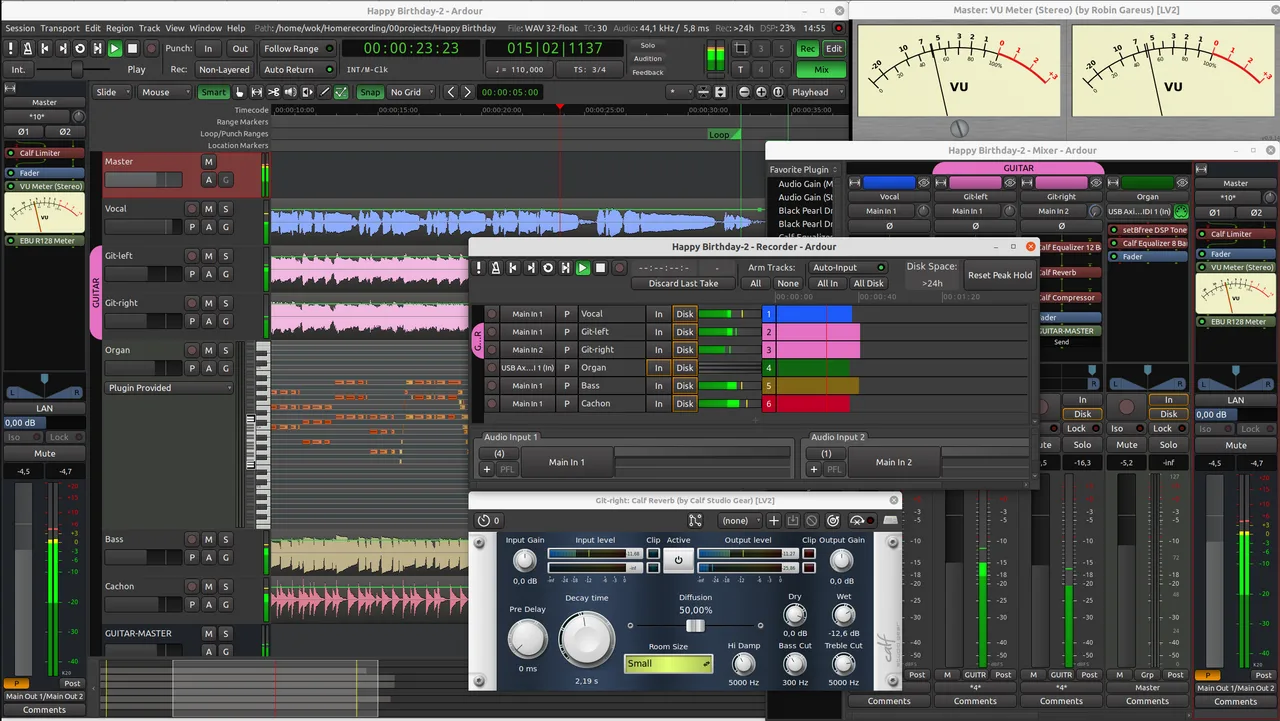

Ardour is a desktop digital audio workstation for recording, editing and mixing audio and MIDI. It offers unlimited tracks and busses, non-linear editing, flexible routing, and LV2, VST2, VST3, AU and LADSPA plug-in support.
The repository’s COPYING file is the GPL version 2. The project funds development through paid ready-to-run downloads and donations; the source code is free. The GitHub repository is a mirror of the project’s own git server.
Quick start
Checked against the project’s own pages on November 22, 2026. Commands are copied from the project’s pages, or from Flathub where the section says so.
Jump to: Linux · Windows and macOS · NixOS
Linux
The download page offers paid ready-to-run builds and the free source code. The Flathub package is community-provided and not verified by the project:
flatpak install flathub org.ardour.ArdourLinux · Free digital audio workstation for recording, editing and mixing audio and MIDI. Paste into your AI assistant. It may only be able to guide you. Review changes before running anything.
Researched from the project's documentation. Checked 2026-11-22. No AI account or connection is needed here.
Read or copy the prompt manually
Windows and macOS
Ready-to-run builds are paid downloads on the Ardour download page; the source code is free for those who don’t want to or cannot pay for the pre-built versions.
Windows and macOS · Free digital audio workstation for recording, editing and mixing audio and MIDI. Paste into your AI assistant. It may only be able to guide you. Review changes before running anything.
Researched from the project's documentation. Checked 2026-11-22. No AI account or connection is needed here.
Read or copy the prompt manually
NixOS
nixpkgs packages Ardour as ardour (source: pkgs/by-name/ar/ardour/package.nix):
environment.systemPackages = [ pkgs.ardour ];Rebuild with sudo nixos-rebuild switch, then launch Ardour from the application menu.
NixOS · Free digital audio workstation for recording, editing and mixing audio and MIDI. Paste into your AI assistant. It may only be able to guide you. Review changes before running anything.
Researched from the project's documentation. Checked 2026-11-22. No AI account or connection is needed here.
Read or copy the prompt manually
First steps
- Create a session and add audio or MIDI tracks for your inputs.
- Connect your audio hardware in the audio/MIDI setup, then record-arm a track and record.
- Edit and arrange regions on the timeline, then mix with the mixer strips and plug-ins.
- Export the session to an audio file when you’re done.
Source: Ardour features and the Ardour manual.
Want help setting this up? Ask FOSSadmin ↗
Find FOSS Index useful? Help keep it growing. Your contribution supports maintaining this directory.