Servers & monitoring

gh-pull
Local pull request dashboard for the GitHub CLI, with saved views, stacked-PR lanes and CI state.
Released 2026-11-19. Snapshot from the included release data, not a live check.
No release-notes excerpt is recorded here.
Open the project's release source ↗Available on these platforms
Runs where the GitHub CLI runs and opens a local dashboard in the browser. Needs a GitHub.com account; GitHub Enterprise hosts are not supported. A desktop tool is not evidence of a native phone app.
Compatibility details and official sources
Official availability checked 2026-11-23. Availability is not feature parity. The recorded release and license refer to the linked source project; separate clients can differ. No install or compatibility test was run.
Before you install
Every pull request that needs you, in one local view.
- Which package?
- A GitHub CLI extension: gh extension install shiqicao/gh-pull, then gh pull. It uses your existing GitHub CLI sign-in.
- Where does my work live?
- The dashboard runs locally in your browser against the GitHub API; your reviews and comments live on GitHub. A GitHub.com account is required.
- Will it run on my machine?
- Linux, Windows, or macOS, anywhere the GitHub CLI runs. GitHub Enterprise hosts are not supported.
Advice and funding routes source-checked November 23, 2026. Researched, not an install or restore test. Installation source ↗ · Report a correction
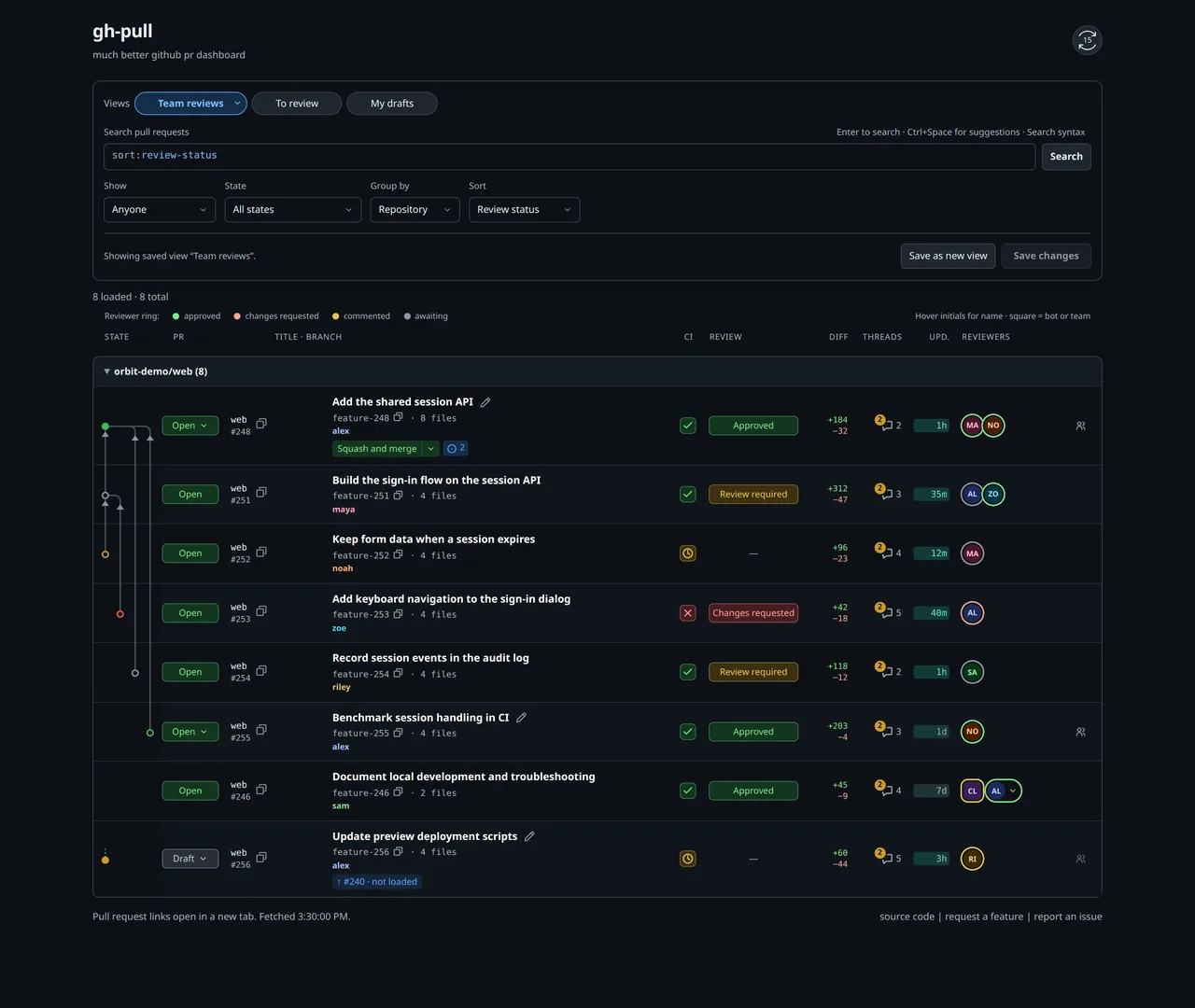

gh-pull is a GitHub CLI extension that opens a pull request dashboard in your local browser. Search across repositories with GitHub qualifiers, save searches as one-click views, group pull requests by repository, author, status or checks, follow stacked PRs through dependency lanes, jump from a failed CI check to its job, track review state and unresolved threads, comment, and merge eligible PRs.
The repository’s LICENSE file is MIT. The project is young (first commits in October 2026) with a single maintainer. It needs a GitHub.com account through the GitHub CLI’s sign-in; GitHub Enterprise hosts are not supported.
Quick start
Researched against upstream documentation on November 23, 2026. We have not installed gh-pull or run these steps as part of this listing.
Jump to: Linux · Windows and macOS · NixOS
Linux
Install the GitHub CLI through your distribution, then:
gh auth login --hostname github.com  # skip if already signed in
gh extension install shiqicao/gh-pull
gh pullLinux · Local pull request dashboard for the GitHub CLI. Paste into your AI assistant. It may only be able to guide you. Review changes before running anything.
Researched from the project's documentation. Checked 2026-11-23. No AI account or connection is needed here.
Read or copy the prompt manually
Windows and macOS
Install the GitHub CLI from cli.github.com, then run the same three commands above in your terminal.
Windows and macOS · Local pull request dashboard for the GitHub CLI. Paste into your AI assistant. It may only be able to guide you. Review changes before running anything.
Researched from the project's documentation. Checked 2026-11-23. No AI account or connection is needed here.
Read or copy the prompt manually
NixOS
The GitHub CLI is packaged in nixpkgs (source: pkgs/by-name/gh/github-cli/package.nix):
environment.systemPackages = [ pkgs.github-cli ];Rebuild with sudo nixos-rebuild switch, then sign in and install the extension with the same gh commands above.
NixOS · Local pull request dashboard for the GitHub CLI. Paste into your AI assistant. It may only be able to guide you. Review changes before running anything.
Researched from the project's documentation. Checked 2026-11-23. No AI account or connection is needed here.
Read or copy the prompt manually
First steps
- Run
gh pull; the dashboard opens in your browser with your existing GitHub sign-in. - Search
is:open is:pr review-requested:@meto find reviews waiting on you, then save that search as a view. - Group by repository to see which pull requests depend on each other.
- Hover a failed CI badge and jump straight to the failing job.
Source: the gh-pull README and usage guide.
Tags: Development
Want help setting this up? Ask FOSSadmin ↗
Find FOSS Index useful? Help keep it growing. Your contribution supports maintaining this directory.