Servers & monitoring

QuelLLM MCP
Local MCP server that lets an AI client search and compare open-weight LLMs, estimate VRAM needs, and compare API versus self-hosting costs.
Release notes / v1.1.0
Released 2026-05-23. Snapshot from the included release data, not a live check.
## What's new in v1.1.0 ### Packaging - Renamed the Python package `server/` → `quelllm_mcp/` with a proper `main()` console entry point. The old top-level `server` package name risked import collisions on user machines. Config and install are unchanged (`command: "quelllm-mcp"`). ### Bug fixes - **`compare()`**: removed the `tokSec` field (it never existed in the quelllm.fr API, so it was always `null`) and exposed the real `ctx` (context window) instead. Replaced the bogus `more_recent` placeholder — which actually compared parameter counts — with honest `more_params` and `larger_context`
Read the full release notes on GitHub ↗Available on these platforms
Runs locally wherever Python 3.10+ and an MCP-compatible client run; the README documents pip and uvx installs from git. Model data is fetched from the quelllm.fr API at query time, so it needs network access. A desktop tool is not evidence of a native phone app.
Compatibility details and official sources
Official availability checked 2026-11-26. Availability is not feature parity. The recorded release and license refer to the linked source project; separate clients can differ. No install or compatibility test was run.
Before you install
Ask your AI client which open-weight model fits your machine.
- Which package?
- An MCP server: uvx --from git+https://github.com/MGM-FALCON/quelllm-mcp.git quelllm-mcp, or pip install from the same repository, then add it to your MCP client's config.
- Where does my work live?
- The server runs locally inside your MCP client. Model data comes from the free quelllm.fr API (CC BY 4.0, no key) and is cached locally for an hour.
- Will it run on my machine?
- Linux, Windows, or macOS with Python 3.10+ and an MCP-compatible client such as Claude Code, Claude Desktop, Cursor or Continue.
Advice and funding routes source-checked November 26, 2026. Researched, not an install or restore test. Installation source ↗ · Report a correction
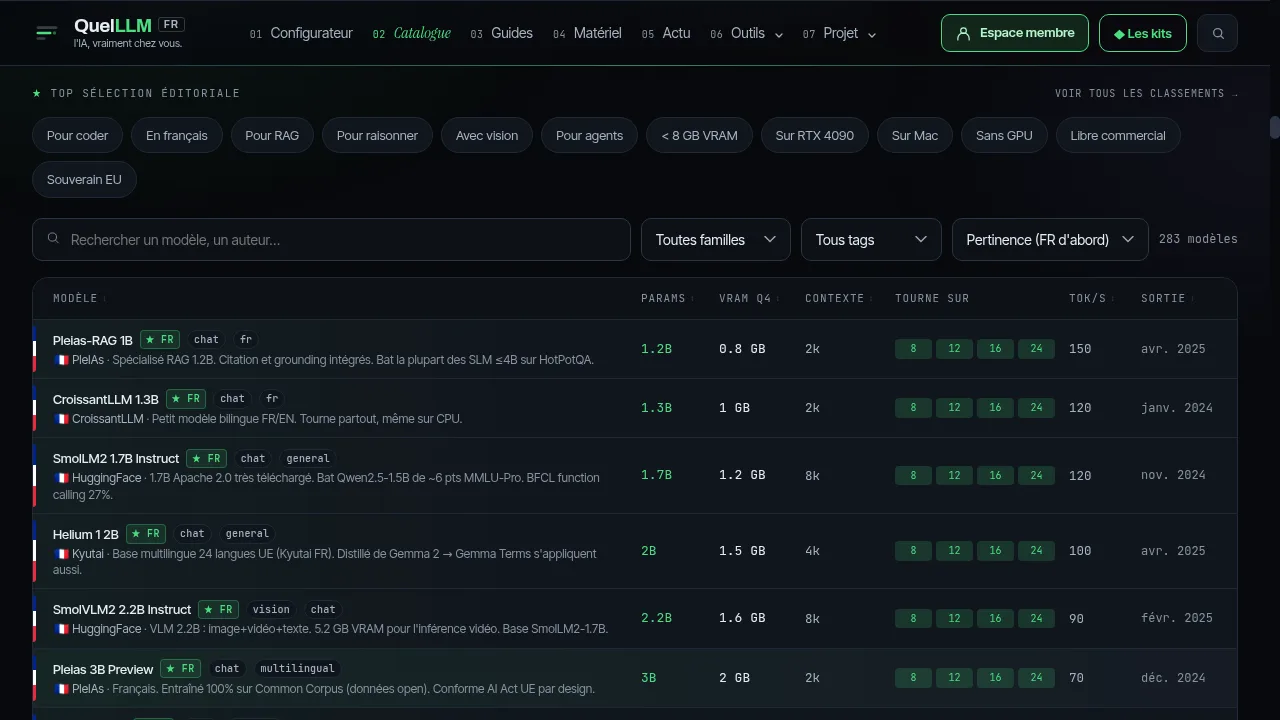
QuelLLM MCP is an MIT-licensed Model Context Protocol server that runs locally and gives an MCP-compatible client - Claude Code, Claude Desktop, Cursor, Continue and others - tools over the QuelLLM catalog of open-weight language models: search and compare models, estimate VRAM at each quantization, and compare API provider costs with self-hosted hardware. The data comes from the free quelllm.fr API (CC BY 4.0, no key) and is cached locally for an hour between lookups.
The name and logo belong to the project. This is an independent listing, not an official QuelLLM resource or an endorsement.
The repository’s LICENSE file is MIT. The project is young (first release in May 2026) with a single maintainer. Two honest caveats from its own README: the cost estimates use price, hardware and electricity assumptions dated May 2026 and are indicative rather than current quotes, and the quelllm.fr site is French-first. The site also sells paid guides; they are not part of this listing, which covers only the open-source server and the free catalog API.
Quick start
Researched against upstream documentation on November 26, 2026. We have not installed QuelLLM MCP or run these steps as part of this listing.
Jump to: Linux, macOS and Windows · NixOS
Linux, macOS and Windows
Run it without installing, using uv:
uvx --from git+https://github.com/MGM-FALCON/quelllm-mcp.git quelllm-mcpOr install it with pip (Python 3.10 or newer):
pip install git+https://github.com/MGM-FALCON/quelllm-mcp.gitThen point your MCP client at it. For Claude Code, add to ~/.claude.json
or a project’s .mcp.json:
{
  "mcpServers": {
    "quelllm": {
      "command": "quelllm-mcp"
    }
  }
}
Or the zero-install variant:
{
  "mcpServers": {
    "quelllm": {
      "command": "uvx",
      "args": ["--from", "git+https://github.com/MGM-FALCON/quelllm-mcp.git", "quelllm-mcp"]
    }
  }
}
Most MCP clients (Cursor, Continue, Cline) accept the same JSON config.
Linux, macOS and Windows · Local MCP server for searching and comparing open-weight LLMs from the QuelLLM catalog. Paste into your AI assistant. It may only be able to guide you. Review changes before running anything.
Researched from the project's documentation. Checked 2026-11-26. No AI account or connection is needed here.
Read or copy the prompt manually
NixOS
QuelLLM MCP is not packaged in nixpkgs at check time. Use the uvx or pip
route above inside a shell that provides them, for example
nix-shell -p uv for the zero-install route.
NixOS · Local MCP server for searching and comparing open-weight LLMs from the QuelLLM catalog. Paste into your AI assistant. It may only be able to guide you. Review changes before running anything.
Researched from the project's documentation. Checked 2026-11-26. No AI account or connection is needed here.
Read or copy the prompt manually
First steps
- Ask your client which models fit your hardware:
list_models(filter_family='Mistral', max_params_b=24). - Estimate VRAM for one model at a chosen quant:
estimate_vram('mistral-small-24b', 'q4'). - Compare two models side by side:
compare('llama33-70b', 'qwen25-32b'). - Compare a monthly token volume across API providers and self-hosted
hardware:
estimate_cost(10_000_000, 2_500_000). Treat the numbers as indicative - the underlying price assumptions are dated May 2026.
Source: the quelllm-mcp README and the QuelLLM API documentation.
Tags: Development
Want help setting this up? Ask FOSSadmin ↗
Find FOSS Index useful? Help keep it growing. Your contribution supports maintaining this directory.