Media & photos

Shotcut
Free video editor with wide format support, built on MLT and FFmpeg.
Released 2026-11-16. Snapshot from the included release data, not a live check.
No release-notes excerpt is recorded here.
Open the project's release source ↗Available on these platforms
64-bit builds; the download page lists the last release supporting older systems (Windows 7/8, macOS 10.14-11). A desktop download is not evidence of a native phone app.
Compatibility details and official sources
Official availability checked 2026-11-22. Availability is not feature parity. The recorded release and license refer to the linked source project; separate clients can differ. No install or compatibility test was run.
Before you install
Timeline video editing without import steps or a subscription.
- Which package?
- The project's AppImage, portable tar or installers, the verified Flathub package, a Snap, or nixpkgs. New versions arrive about every two months; you choose when to update.
- Where does my work live?
- Projects are files on your disk and media stays where you keep it. Editing and export happen locally.
- Will it run on my machine?
- 64-bit Linux, Windows 10/11 on Intel/AMD or ARM, or macOS 12+. The download page lists the last release for older systems.
Advice and funding routes source-checked November 22, 2026. Researched, not an install or restore test. Installation source ↗ · Report a correction
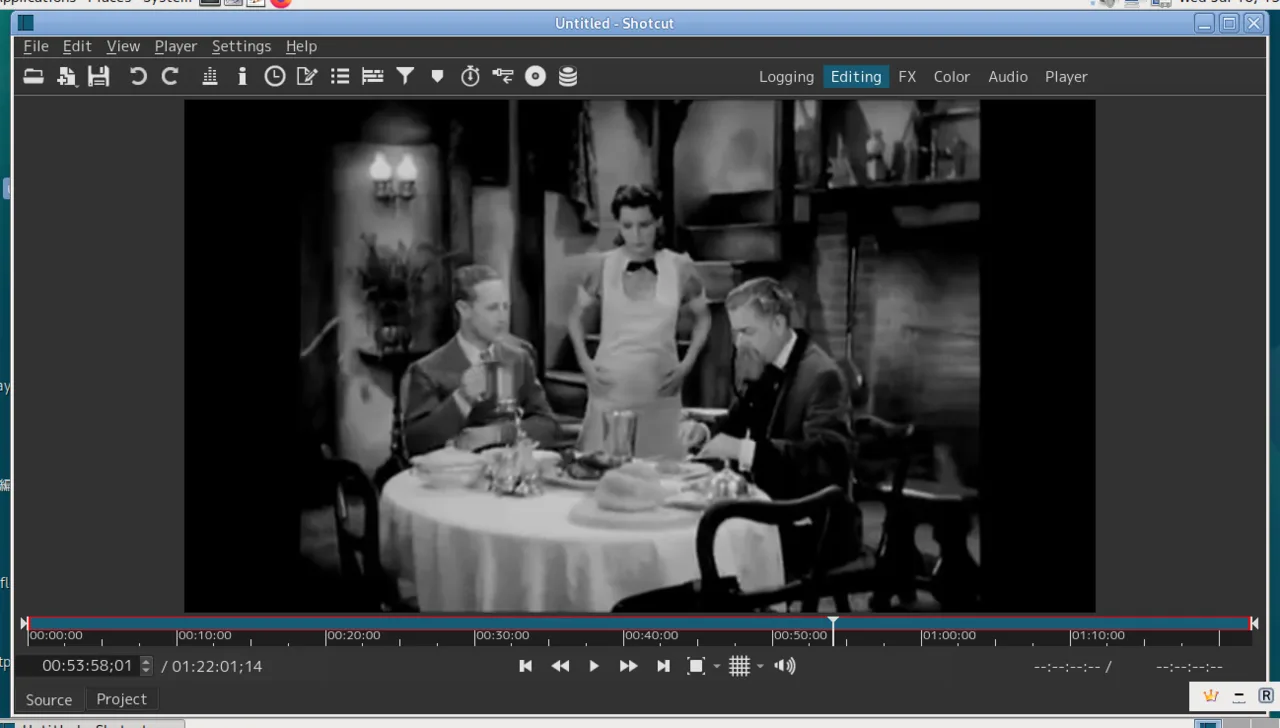

Shotcut is a desktop video editor for Linux, Windows and macOS. It edits natively without importing, supports hundreds of formats through FFmpeg, and handles multi-format timelines and resolutions up to 4K.
The repository’s COPYING file is the GPL version 3. New versions arrive about every two months, and you choose when to update.
Quick start
Checked against the project’s own pages on November 22, 2026. Commands are copied from the project’s pages, or from Flathub where the section says so.
Jump to: Linux · Windows and macOS · NixOS
Linux
The download page offers an AppImage and a portable tar archive. The Flathub package is verified by its publisher:
flatpak install flathub org.shotcut.ShotcutA Snap is also available: snap install shotcut --classic.
Linux · Free video editor with wide format support, built on MLT and FFmpeg. Paste into your AI assistant. It may only be able to guide you. Review changes before running anything.
Researched from the project's documentation. Checked 2026-11-22. No AI account or connection is needed here.
Read or copy the prompt manually
Windows and macOS
Installers are on the Shotcut download page: Windows 10/11 on Intel/AMD or ARM, and a universal build for 64-bit macOS 12 and later. The page lists the last release that supports older systems.
Windows and macOS · Free video editor with wide format support, built on MLT and FFmpeg. Paste into your AI assistant. It may only be able to guide you. Review changes before running anything.
Researched from the project's documentation. Checked 2026-11-22. No AI account or connection is needed here.
Read or copy the prompt manually
NixOS
nixpkgs packages Shotcut as shotcut (source: pkgs/by-name/sh/shotcut/package.nix):
environment.systemPackages = [ pkgs.shotcut ];Rebuild with sudo nixos-rebuild switch, then launch Shotcut from the application menu.
NixOS · Free video editor with wide format support, built on MLT and FFmpeg. Paste into your AI assistant. It may only be able to guide you. Review changes before running anything.
Researched from the project's documentation. Checked 2026-11-22. No AI account or connection is needed here.
Read or copy the prompt manually
First steps
- Open files by dragging them into Shotcut, or from the menu and toolbar.
- Use J, K and L to control playback speed and direction, and I and O to set in and out points.
- Add clips to the playlist, drag them onto the timeline, then trim and arrange them.
- Export from the Export panel when you’re done.
Source: the Quickstart on the Shotcut home page and its tutorials.
Want help setting this up? Ask FOSSadmin ↗
Find FOSS Index useful? Help keep it growing. Your contribution supports maintaining this directory.